Every phone in the venue,
on cue.
Timecode and show audio to every crew position. The soundtrack, synced pre-show videos and crowd lights on every phone in the audience. One clock, one GO — from a QR code, no app.
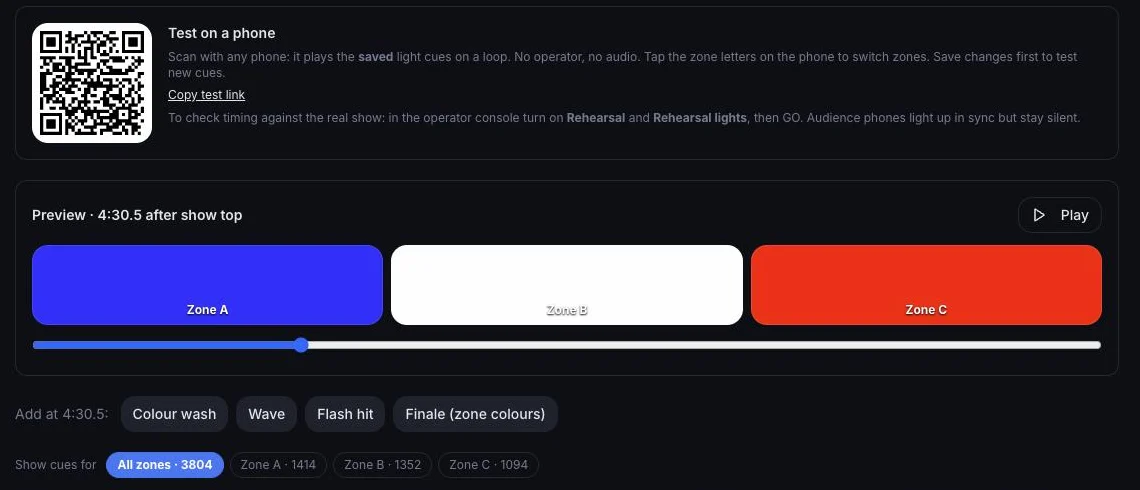
Above: the real drone file from the American Samoa USA 250th Anniversary July 4th show — 300 drones over Pago Pago — imported into SyncStage Lights. Zones A, B and C show exactly what those sections of the crowd would see.
From doors to finale, on one clock.
The operator presses GO once. Everything else — crew outputs, the crowd’s soundtrack, videos and lights — follows the same show clock.
- 01
Doors
People scan the QR code. A branded waiting screen counts down, shows sponsor slides and quietly downloads the show.
- 02
Pre-show
Your welcome and sponsor videos play on every phone at the same moment, with captions for loud venues.
- 03
GO
The operator hits GO. Timecode rolls to pyro, drones and lighting; show audio starts everywhere at once.
- 04
Show
Phones play the soundtrack in sync and light up by seating zone, cue by cue. No ads during the show.
- 05
After
A thank-you screen with your sponsor offer, and analytics on how many phones joined and who tapped.
Turn the crowd into part of the show.
Every phone becomes a light. Split the audience into seating zones, each with its own QR code, and the screens change colour on cue: washes, waves, pulses and finales across the whole venue.
Import your drone show
Load a Verge Aero Design Studio export (.vviz) and the crowd mirrors the sky: each zone takes the colour of the formation in front of it. New version of the drone file? One click to replace it.
Or light the whole show in one click
Fill the soundtrack with an automatic pattern, build your own cues, or import a cue sheet from a spreadsheet.
Safe by design
Flashing is capped at 3 per second for photosensitive viewers, and anyone can turn the lights off and keep the audio.
Turn the wait into sponsor revenue.
The minutes before the show are the most-watched screen time of the night. SyncStage lets you sell them — without ever putting an ad in the show itself.
A real run of show
Countdown or time-of-day start, then welcome and sponsor videos in order, then the show. Follow on automatically after a beat, or hold for the operator’s GO. Timecode can roll through the pre-show or start at GO.
Sponsor videos everyone sees
Pre-show videos play on every phone at the same moment — a captive, synced audience for the welcome message, the city partner and the title sponsor. Captions for loud venues.
Carousel, links and offers
A sponsor carousel on the waiting screen, tap-through to each sponsor’s site, and a thank-you offer after the finale. Slides can run on date ranges.
Proof for your sponsors
Phones connected at peak, sponsor impressions and taps, plays per show. Hand sponsors real numbers and price the next show on them.
Your marketing team runs it: invite them as Editors and they manage branding, sponsor slides, pre-show videos and lights — while audio, timecode and GO stay with the producer.
Run the whole show from one screen.
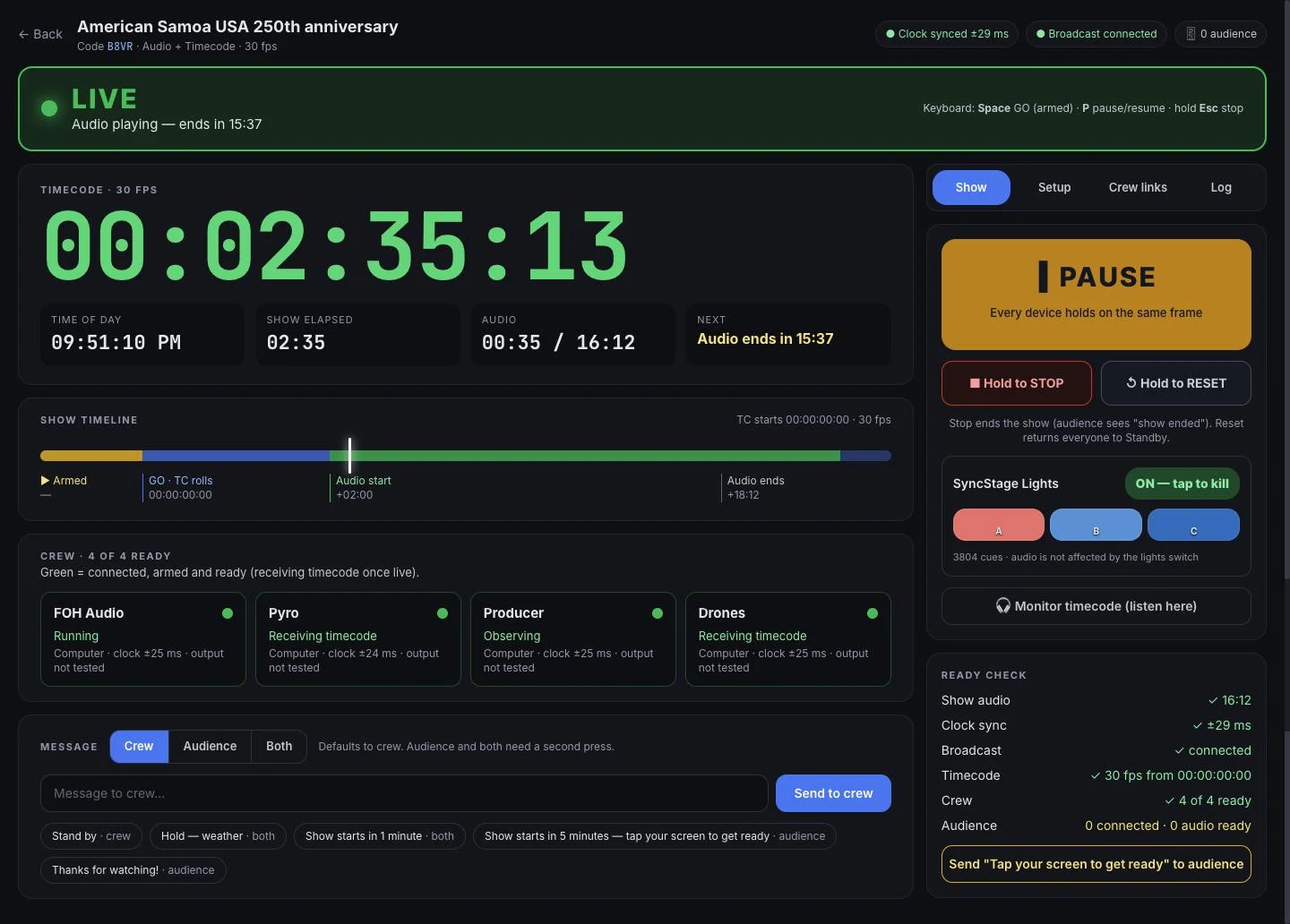
Countdown, show clock, timeline and crew status at a glance. ARM checks crew, audio and clock before GO is allowed. Hold or skip pre-show videos, pause and resume, rehearse with crew in sync while the audience stays silent, and kill the crowd lights with one tap.
Timecode and audio to every position.
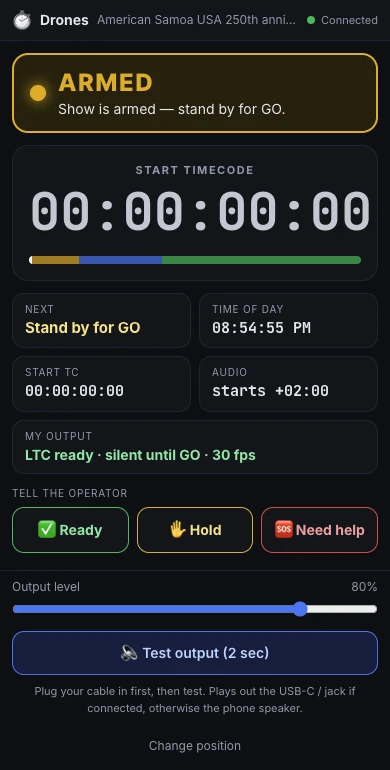
Pyro, drones, FOH, lighting, video: each position gets its own link or QR code. Plug a phone into the firing system or desk, tap to arm, and it puts out exactly what that position needs.
SMPTE LTC at every common rate
23.976, 24, 25, 29.97 drop-frame and non-drop, and 30 fps. Start the show top at any timecode, roll timecode through the pre-show, or start it at GO.
Audio, timecode or both from one phone
Music on one side, timecode on the other — through the headphone jack or a USB-C adapter, on iPhone and Android. Output test and level per phone.
Observers
Producers, stage managers and sponsors can follow the clocks, run of show and messages without putting anything out.
Two kinds of show. Minutes to set up.
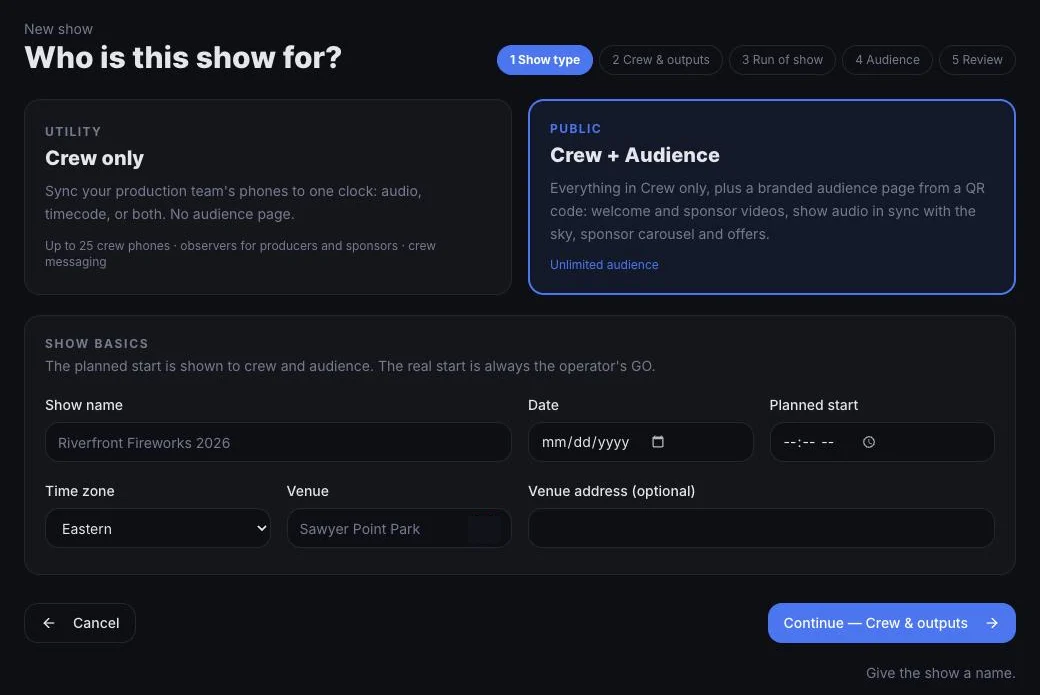
Crew only for production teams that need timecode and audio on every position. Crew + Audience when you want the crowd in sync too. Pick the outputs, add your music and run of show, and print the QR codes. Big lossless WAVs are fine — the crew get the original, phones get a slim copy made for them automatically.
Everything the show needs. Nothing it doesn’t.
No app to install
Everything runs in the browser on iPhone and Android. Scan the QR code and you are in.
One clock for everyone
Every phone syncs to the show clock and corrects itself. The operator sees sync accuracy live.
Synced pre-show videos
Welcome and sponsor videos in sync on every phone, converted for phones automatically, with captions.
Sponsors without the noise
Sponsor carousel and offers before and after — never during the show. Taps and impressions are tracked.
Your brand
Your logo and colours on the audience screens, with a custom waiting message and thank-you offer.
Team roles
Invite marketing as an Editor for branding, sponsors and lights, or clients as Viewers. Audio, timecode and GO stay with the producer.
Show-day safe
Settings lock while the show is armed or running. Hold for GO or follow on automatically.
Analytics
Phones connected at peak, plays, sponsor impressions and taps for every show.
Made for shows where timing is everything.
Fireworks
Timecode straight into the firing system, soundtrack on every phone in the crowd.
Drone light shows
Timecode to the drone system and a crowd that lights up with the formation.
Festivals & concerts
Crowd light moments by section, sponsor videos while people wait.
Holiday celebrations
July 4th, New Year’s Eve and city celebrations where the audience is spread out.
Sports & halftime
Stadium light moments and timecode for halftime production.
Corporate & launches
Synced reveal moments and branded screens for every guest.
Frequently asked questions
What is SyncStage?
+
SyncStage is a browser-based show-control platform for live events. It sends SMPTE timecode and show audio to crew phones (pyro, drones, FOH, lighting) and plays the soundtrack, synced pre-show videos and crowd lighting on audience phones, all on one show clock started by the operator’s GO. Crew and audience join by scanning a QR code; no app or extra hardware is needed.
How is SyncStage different from a wireless timecode or music-sync box?
+
A sync box sends timecode to one place. SyncStage sends timecode and audio to every crew position from ordinary phones, shows the operator who is connected and ready, and also reaches the audience — soundtrack, pre-show sponsor videos and phone lights — from the same GO.
Do audience members need to download an app?
+
No. SyncStage runs in the phone’s web browser. People scan a QR code and they are in — iPhone and Android.
Which timecode frame rates are supported?
+
SMPTE LTC at 23.976, 24, 25, 29.97 drop-frame, 29.97 non-drop and 30 fps. You can set any show-top timecode and choose whether timecode rolls through the pre-show or starts at GO.
Can a phone send timecode into a firing system or drone system?
+
Yes. A crew phone outputs LTC through the headphone jack or a USB-C audio adapter, on iPhone and Android. One phone can also put out show audio on one side and timecode on the other.
Can phones light up in sync with a drone show?
+
Yes. SyncStage Lights imports a Verge Aero Design Studio .vviz file and turns the drones’ colours into light cues by seating zone, so the crowd mirrors the formation in the sky. Revised drone files replace the old ones in one click.
Is the crowd lighting safe for photosensitive people?
+
Flashing and pulsing are capped at 3 per second, and every phone has a button to turn the lights off and keep the audio.
What happens if the signal drops during the show?
+
Phones download the show audio while people wait, so the soundtrack does not stream during the show. Each phone keeps its place on the show clock and catches up with any operator change when the connection returns.
Can sponsors appear in the show?
+
Before and after it. Sponsor videos play in the pre-show and sponsor slides and offers appear on the waiting and thank-you screens. Nothing is shown during the show itself.
Can my marketing team manage branding and sponsors?
+
Yes. Invite them to a show as an Editor: they can change branding, sponsor slides, pre-show videos and lights for that show only. Audio, timecode, setup and the operator console stay with the producer.
Put your next show on one clock.
Set up a show in minutes. No hardware to buy and no app to install — crew and audience join from a QR code.